Hello everyone,
Like many server owners, I’ve always found it a bit tedious to manage the color codes (^1, ^e, etc.) for BeamMP server titles and descriptions. It’s hard to visualize the final result without testing it directly in-game, which can be time-consuming.
To simplify all of this, I’ve developed a small online tool, available for everyone:
BeamMP Color Editor (beammpeditor.mateo08.fr)
What does it do?
It’s a “WYSIWYG” (What You See Is What You Get) editor that allows you to:
- Write your server title and description.
- Apply colors and styles (bold, italic, etc.) with simple buttons, without having to memorize the
^codes. - See a real-time preview of what it will look like in-game.
- Copy the formatted code in one click to paste it directly into your
ServerConfig.tomlfile.
The goal is to save time and make customization easier for everyone.
Here’s what it looks like:
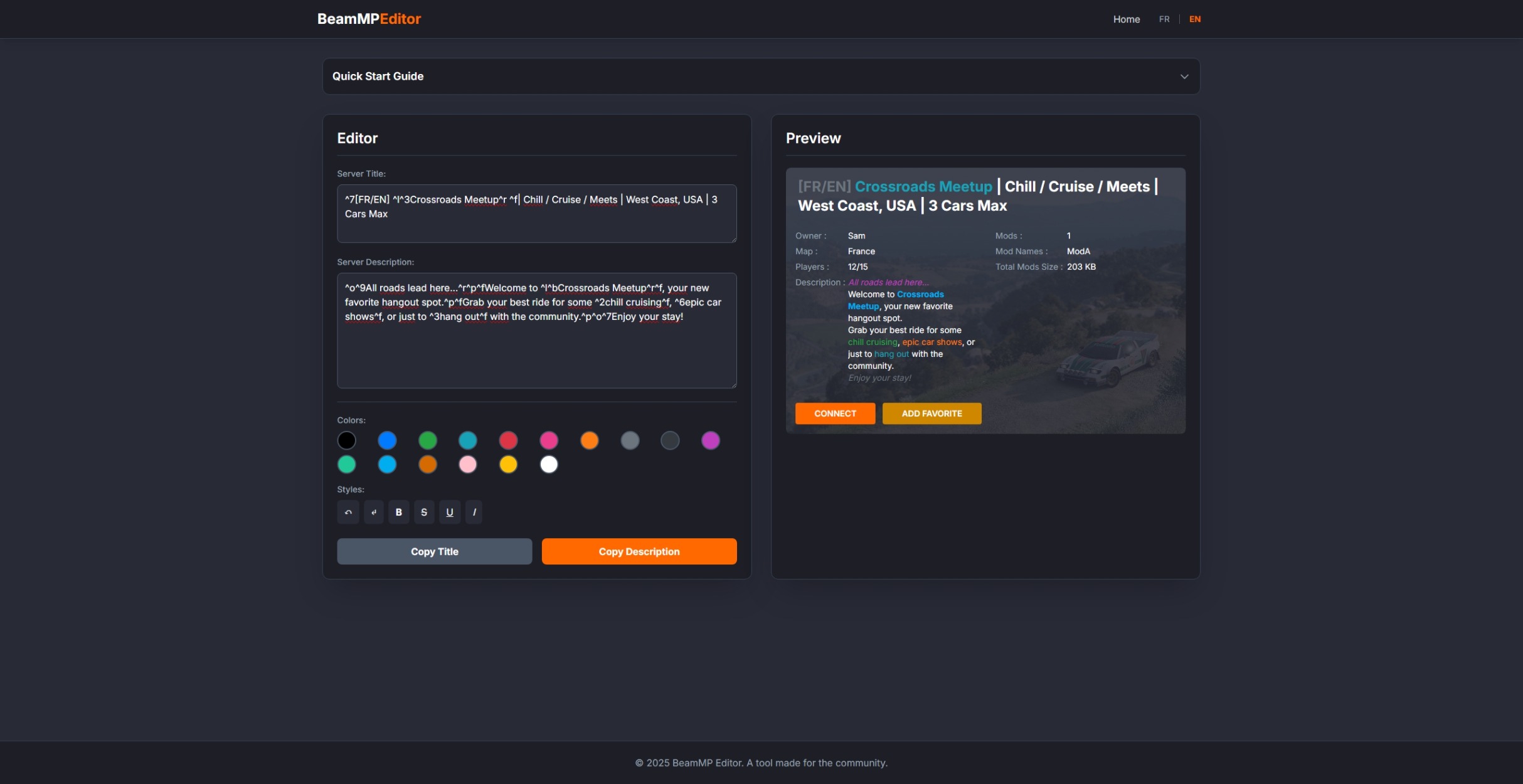
The tool is simple but functional. Feel free to give me your feedback, report any bugs, or offer suggestions for improvement!
Thanks and have fun!